PDS Technology Dual-Display Vehicle Computers for Precision Agriculture
Precision agriculture equipment often needs to display more than one type of information at the same time. RTK GNSS guidance, machine data, implement information, and camera views may all need to be available within the operator’s working environment.
A dual-display vehicle computer solution provides one way to organize these functions across two independent displays while keeping the main computing resources in a single vehicle computer. For agricultural machinery OEMs, procurement teams, mechanical engineers, and software developers, this architecture can be considered when a single display does not fit the required information layout.
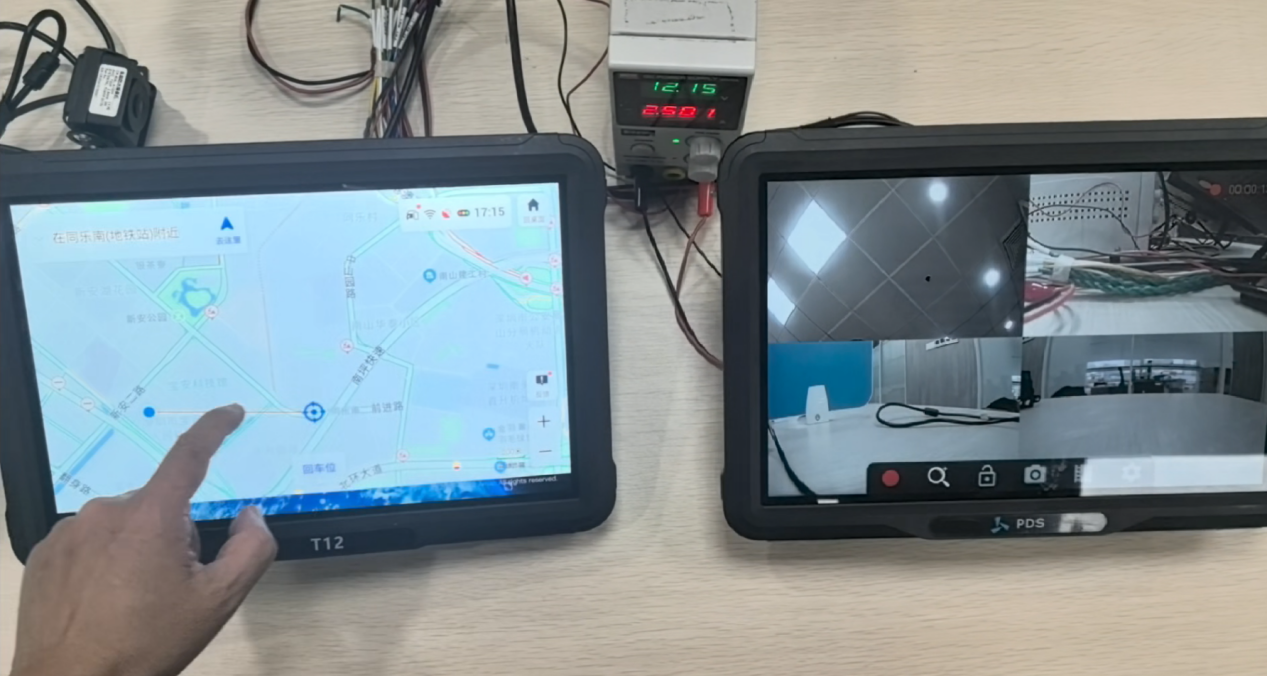
One example of this architecture uses a 12-inch vehicle-mounted computer as the main computing platform, together with a separately connected secondary display. This type of configuration can be considered for precision agriculture applications that require multiple visual interfaces in the same cabin.
Why Consider a Dual-Display Solution for Precision Agriculture?
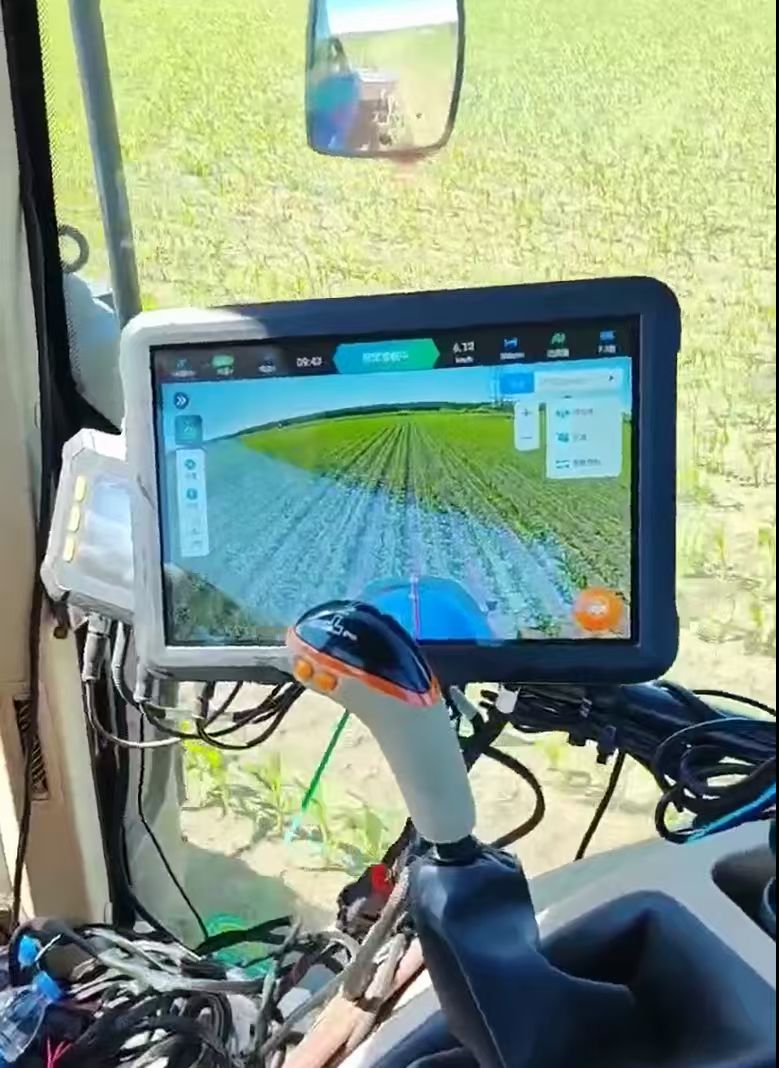
Agricultural machinery may need to present several information sources during operation. A typical configuration can include RTK GNSS guidance on the primary screen, while the secondary display shows camera views, machine operating information, implement data, or another application interface.
The main reason to consider two displays is not simply to make the cabin look more advanced. It is to give the equipment manufacturer another way to divide information.
With a single display, different functions may need to share the same interface. The final design depends on the application software, operator workflow, and machine requirements. A dual-display architecture provides separate visual areas for different functions without requiring two complete vehicle computing platforms.
For some agricultural machines, a single rugged vehicle computer may still be sufficient. The dual-display approach is more relevant when several information sources need to be presented independently.
In this configuration, the T12 serves as the main computing unit.
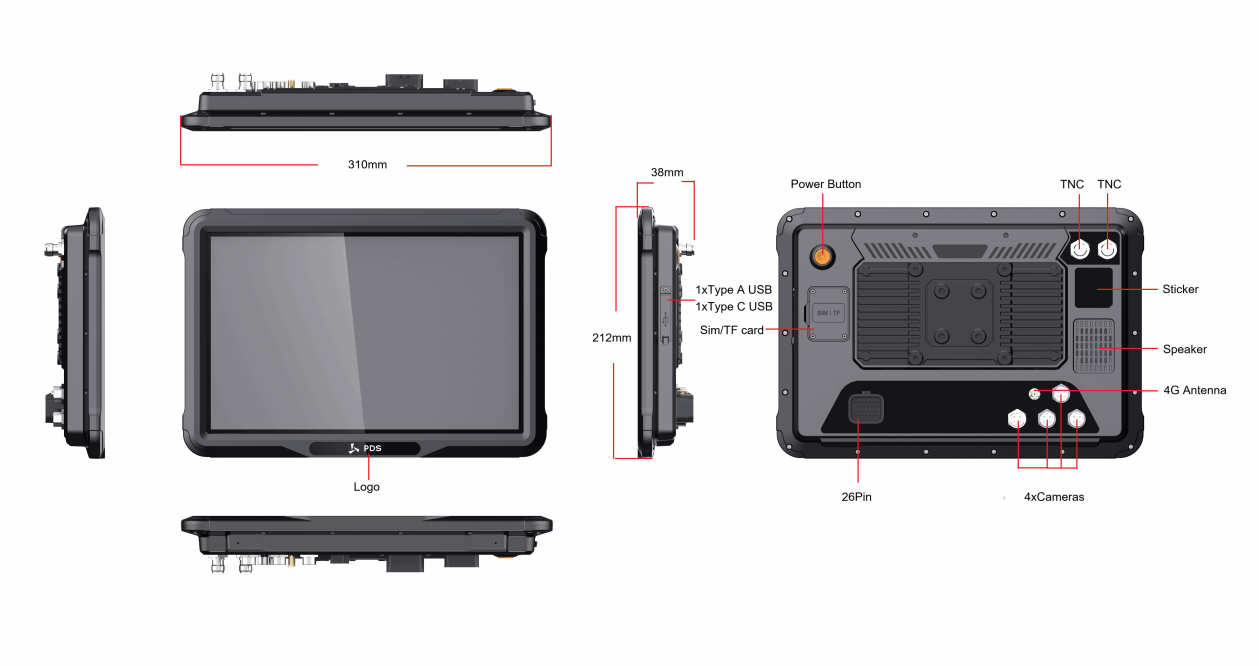
The T12 is a 12.1-inch rugged vehicle computer with a 1280 × 800 IPS display and a published brightness of 750 nits. The current product information also lists Android 13 or Linux Kernel 5.15 + QT 5.15, RTK positioning support, multiple camera inputs, CAN interfaces, and industrial vehicle connectivity.
The second display is connected to the main unit and can be installed separately according to the cabin layout. The solution described in the PDS technical material supports a secondary display from 8 to 12 inches, with independent touch operation. The display connection uses a coaxial cable up to 3 meters long, with a 4-pin FAKRA interface and FPD-Link III technology.
The basic architecture can therefore be understood as:
This is different from installing two independent vehicle computers. Computing, memory, and thermal management are centralized in the main unit according to the solution architecture described by PDS Technology.
What Can the Two Displays Show?
The exact screen assignment depends on the machine and software architecture, but several application combinations can be considered.
RTK GNSS Guidance + Camera Views
The main display can be used for RTK GNSS guidance while the secondary display presents camera or surround-view images.
This type of layout can keep guidance information and visual monitoring available at the same time without requiring constant switching between interfaces.
RTK GNSS Guidance + Machine Information
For machines that need to monitor vehicle operating data together with positioning information, the secondary display can be assigned to machine information while the primary screen remains focused on guidance.
Guidance + Implement Information
Implement-related information can also be assigned to the secondary display when the OEM software architecture supports this configuration.
Primary Application + Secondary Application
The second screen does not have to duplicate the first. OEMs can define different application interfaces according to their own system design.
The key point is that the dual-display solution provides a hardware architecture for separating information. The actual applications and functions still depend on the software and machine system.
What Should Agricultural OEMs Check Before Integration?
A dual-display vehicle computer should be evaluated as part of the complete machine architecture.
1. Display Size and Cabin Layout
The available mounting area should be confirmed before choosing the secondary display size.
The T12 main screen is 12.1 inches, while the secondary display in the solution can be customized from 8 to 12 inches. This allows different display sizes to be considered for different cabin layouts.
2. Cable Routing and Connector Location
Mechanical engineers should check cable length, routing space, connector position, and access for installation and servicing.
The current solution specifies a coaxial connection of up to 3 meters, using a 4-pin FAKRA interface and FPD-Link III.
3. RTK GNSS Requirements
For precision agriculture equipment, the RTK GNSS configuration should be evaluated together with the vehicle control system, application software, antenna installation, and correction-data architecture.
The T12 supports RTK positioning for precision applications.
4. Vehicle Communication Interfaces
The communication architecture is another important selection factor.
The T12 product information lists CAN interfaces and SocketCAN support, while PDS also states experience integrating J1939 and ISOBUS-VT applications.
For a new project, engineering teams should still confirm the exact communication channels, protocols, data requirements, and software integration scope.
5. Environmental and Electrical Requirements
The T12 specification includes a 9–36 V DC input range, ISO 7637-2 power requirements, and IP66 protection. PDS also lists vibration and shock testing according to MIL-STD-810G on its current product information.
These specifications should be reviewed against the actual machine environment and project validation requirements. A product specification alone does not determine suitability for every installation.
What Should Procurement Teams Look At?
For procurement, the key comparison is not only the price of one display or one vehicle computer.
A dual-display architecture may be compared with a design based on two independent onboard computing terminals.
By centralizing computing, memory, and thermal management in one main unit, the PDS architecture avoids duplicating these resources in a second complete computing platform. In the tested configuration, the supplier reported a potential hardware procurement cost reduction compared with purchasing two independent onboard terminals.
This figure should be treated as an internal estimate for the tested configuration, not as a guaranteed saving for every agricultural machinery project.
Procurement teams should also compare:
- Required display sizes
- Number of computing platforms
- Vehicle interfaces
- Mechanical integration requirements
- Environmental specifications
- Customization scope
- OEM/ODM support
Looking at the complete configuration is usually more meaningful than comparing unit prices alone.
What Should Software Manufacturers and System Integrators Consider?
The dual-display architecture also affects application design.
Before software development starts, teams should clarify:
- Which application runs on the primary display?
- Which functions belong on the secondary display?
- How is touch input handled?
- How are GNSS and vehicle data accessed?
- Which CAN/CAN FD interfaces are required?
- How will camera views be integrated?
- What operating system and software environment will be used?
The T12 supports Android 13 as well as Linux Kernel 5.15 + QT 5.15, giving OEMs and software teams different options depending on the project software stack.
For projects involving J1939 or ISOBUS-VT, interface compatibility should still be evaluated against the final system architecture rather than assumed from a general platform specification.
When Is a Dual-Display Solution Not Necessary?
Not every agricultural machine needs two displays.
A single rugged vehicle computer may be sufficient when the machine has a relatively simple interface, limited information requirements, or no need to present multiple functions simultaneously.
A dual-display architecture is more worth evaluating when the machine needs to separate functions such as:
The right configuration depends on the machine, not on the number of screens alone.
| Item | Specification |
|---|---|
| Main computing platform | PDS T12 |
| Main display | 12.1-inch IPS |
| Resolution | 1280 × 800 |
| Brightness | 750 nits |
| RTK GNSS | Supported |
| Secondary display | 8–12 inch customization |
| Secondary touch | Independent touch |
| Display connection | Coaxial cable, up to 5 m |
| Power Cable Connector | 26-pin |
| Display technology | FPD-Link III |
| Vehicle interfaces | CAN / CAN FD |
| Software interface | SocketCAN |
| Integration experience | J1939 / ISOBUS-VT |
| Power input | 9–36 V DC |
| Protection | IP66 |
| OS options | Android 13 / Linux Kernel 5.15 + QT 5.15 |
The configuration should be confirmed against the exact OEM project before procurement or production.
Frequently Asked Questions
What is a dual-display vehicle computer solution?
It is a vehicle computing architecture that uses one main computing platform with two independently controlled displays for different information or applications.
What can the secondary display show in precision agriculture?
Depending on the system design, it can show camera views, machine information, implement information, or another application interface.
Is the PDS T12 the second display?
No. The T12 serves as the main vehicle computing platform in the dual-display solution. The second screen is a separate display connected to the T12.
What size can the secondary display be?
The solution supports customization from 8 to 12 inches.
Does the T12 support RTK GNSS and CAN?
Yes. The T12 supports RTK GNSS positioning and CAN interfaces. With the PDS SDK, customers can access CAN data and develop applications based on protocols such as J1939 and ISOBUS-VT. PDS also has experience in J1939 and ISOBUS-VT applications.
Can the dual-display architecture reduce procurement costs?
The tested configuration was reported to require less hardware procurement than two independent onboard terminals. Actual cost differences depend on the equipment configuration and project requirements.
Conclusion
A dual-display vehicle computer solution can be considered when precision agriculture equipment needs separate visual interfaces for guidance, machine information, implement data, cameras, or other applications.
The example configuration uses the T12 as the main computing platform and adds a separately connected secondary display. This architecture allows OEMs to evaluate display configuration, cabin layout, RTK GNSS, vehicle communication, environmental requirements, and software integration as one system rather than selecting each element independently.
For agricultural machinery manufacturers and technology companies, the most suitable configuration should be determined from the actual machine architecture and application requirements. The dual-display approach is one option to evaluate when multiple operator interfaces are needed within the same vehicle cabin.
 Escorts Kubota
 FieldZero
 Indico Company
 Kubota
 FFBS
FFBS Jontra
 Kalustyan
 Tucor
Tucor Geno
Geno Hayleys Agriculture
 Linx Agritech
 Adinet
 Save Your Soils