
Mine planning · How-to guide
Mine Development Projects 3D Visualization: 7 Steps
Mine development projects 3D visualization puts terrain, drill data, geology and engineering in one scene. The seven steps below start with the data, because the model is only as good as its weakest layer.
Key takeaways
- Major mines opened in 2010-2019 took 16.5 years on average from discovery to production (IEA, 2021), so a model must be kept current.
- Copernicus GLO-30 specifies under 4 m vertical accuracy at 90% confidence, against 10 cm RMSEz for USGS QL2 lidar.
- One metre of height error over 50 hectares equals 500,000 cubic metres in the worst case.
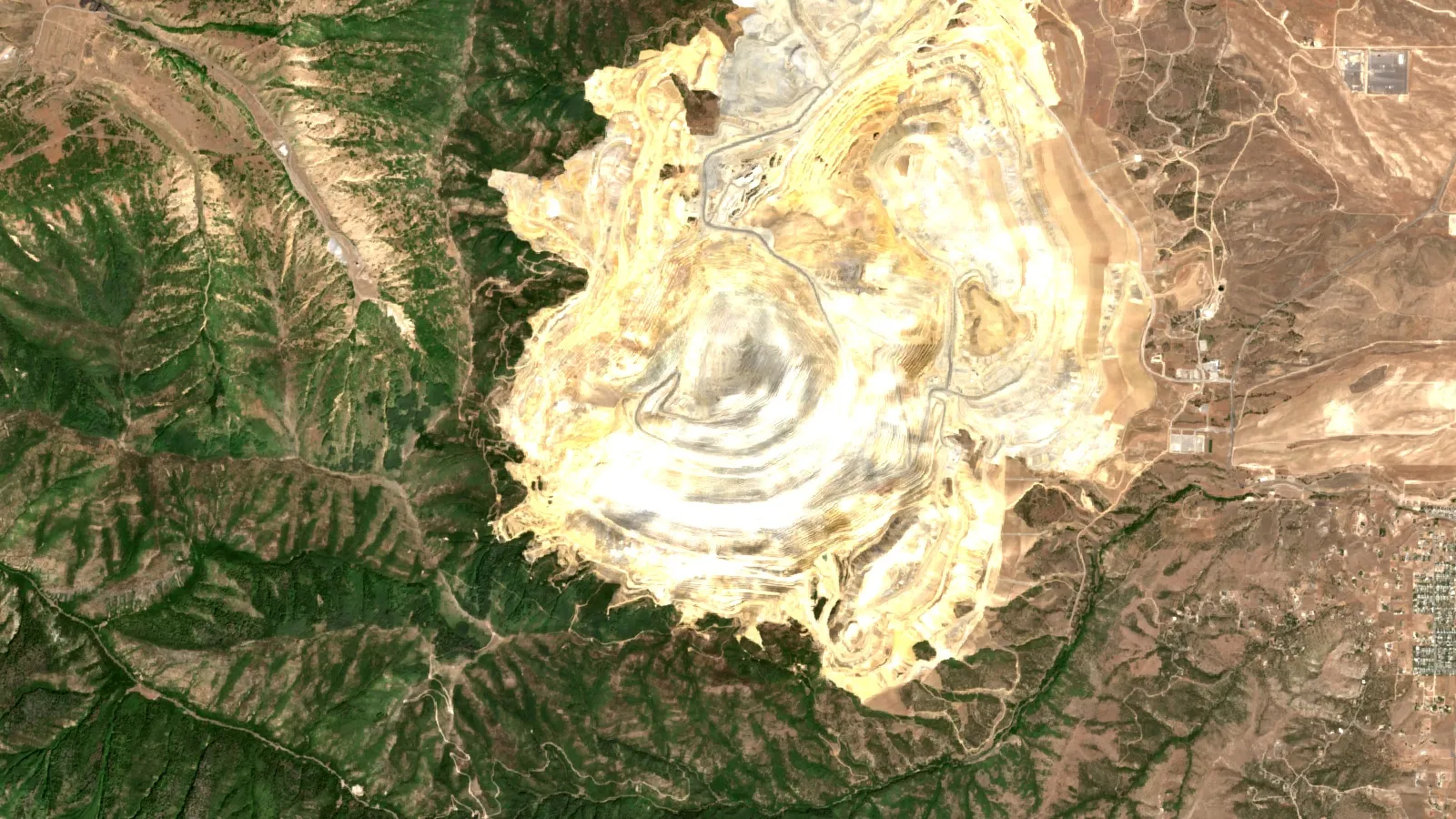
- At Bingham Canyon in 2013, before-and-after elevation models were used to estimate a slide of 165 million tons (GSA Today, 2014).
- A 3D view does not replace a qualified person’s resource work or a regulator’s required plans.
In this article
- What a mine development 3D model contains
- Why the visualization matters during long project timelines
- Terrain data for 3D visualization: accuracy compared
- How to build a mine development 3D visualization in 7 steps
- 3D visualization of a mining pit: what Bingham Canyon shows
- How much terrain error costs in tonnes
- Ore processing plants 3D visualization
- Underground development and ventilation in 3D
- 3D visualization software for mining compared
- What 3D mine visualization costs
- Mine site development 3D animations and videos
- Using 3D models for permits, closure and stakeholders
- What to check before you trust a 3D mine model
- Frequently asked questions
Mine development projects 3D visualization means combining terrain, drill data, the geological model and engineering designs in one scene, so a team can see the planned mine before it is built. It usually takes seven steps, from defining the decision to keeping the model current. The accuracy of the result depends on the weakest input, which is why this guide starts with data and not with the software.
The stakes are large. The International Energy Agency found that major mines opened between 2010 and 2019 took 16.5 years on average from discovery to first production. A model built early can serve many of those years if it is kept up to date. One built only for a presentation is usually out of date within months.
What a mine development 3D model contains
A working scene has several layers. Each has its own owner, source and date. A consultant reviewing a project should be able to switch each layer on and off and ask where it came from.
Infographic
How the model grows through a project, in 6 stages
- 1Desk studyTerrain, imagery and licence boundaries.
- 2DrillingCollars, assays and first geology shapes.
- 3Resource workBlock model and qualified review.
- 4DesignPit or underground, dumps, tailings and plant.
- 5ConstructionSurveys replace design surfaces.
- 6ClosureFinal landform and water paths.
- Terrain: a digital elevation model (DEM), which is a grid of ground heights, often with satellite or drone imagery draped over it.
- Drill data: collars, downhole surveys, assays and rock logs. A collar is the point where a hole starts at surface. An assay is the lab measurement of metal content.
- Geology: rock units, faults and mineralized shapes, known as wireframes or solids.
- Block model: a 3D grid of cells holding estimated grade, density and rock type. Grade is the amount of metal in the rock, such as grams per tonne (g/t) or percent.
- Engineering: pit shells, ramps, declines, stopes, waste dumps, tailings facilities, roads, power and water lines. A decline is a sloping access tunnel. A stope is the underground opening from which ore is mined.
- Plant: crushers, conveyors, mills, tanks, leach pads and buildings.
- Environment and land: licence boundaries, streams, buildings and the closure landform.
Not every project needs every layer. An early prospect might have terrain, imagery and a few geological shapes. A project near a construction decision needs all of them at engineering accuracy. For background on the rocks being modelled, see our guide to types of ore deposits.
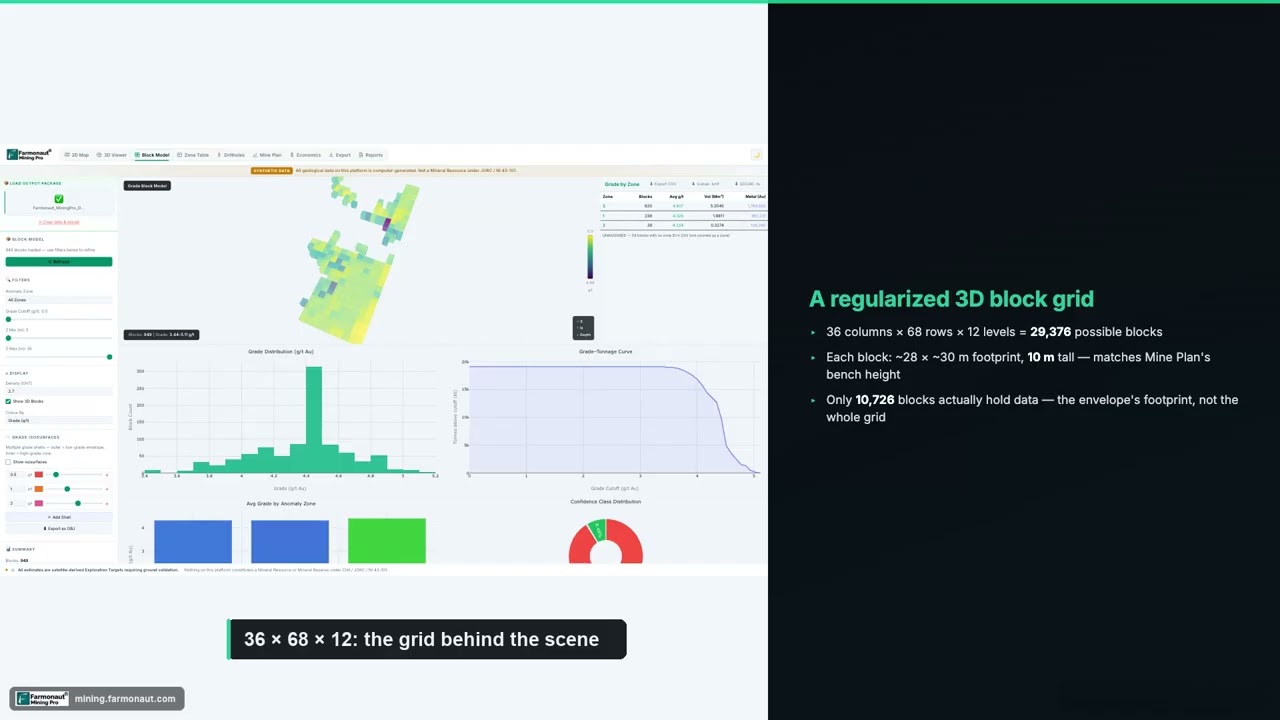
▶ What a block model is, shown as a 3D grid on de-identified demo data (5:23) · 5:23
Why the visualization matters during long project timelines
The IEA analysis splits those timelines into more than 12 years of exploration and feasibility work and 4 to 5 years of construction. The figures are averages and vary by mineral, location and mine type. The people on a project change over that time, and so do its owners and consultants. A shared model keeps the reasoning visible: why a portal sits where it does, which holes support a shape and which layout was rejected.
Chart
Where the time goes from discovery to first production
Years, major mines opened 2010-2019; the build bar uses the 4.5-year midpoint, and exploration is stated as more than 12
A model also helps people who do not read cross-sections. An investor, a land agency or a neighbouring community can follow a walk-through when a stack of engineering drawings would mean little. That does not make the model correct. A clear picture of a weak interpretation can be more misleading than a rough one, so every view should state its data date and how confident the team is in it.
Terrain data for 3D visualization: accuracy compared
Terrain is the base of the scene, and the options differ by a factor of more than ten in height accuracy. Use the cheapest source that can support the decision, then upgrade it as the project advances.
Chart
Finer terrain grids usually come with smaller height errors
Published specifications; Copernicus is 90% linear error, USGS levels are RMSEz, so compare scale only
- Global satellite elevation. The Copernicus GLO-30 DEM has about 30 m grid spacing and an absolute vertical accuracy specification under 4 m at 90% confidence. The ASTER Global DEM also has roughly 30 m posting. These suit desk studies, access planning and regional context.
- Satellite imagery. Sentinel-2 has four bands at 10 m resolution and a 290 km swath. Draped over a DEM, it shows roads, old workings, vegetation and water.
- Airborne lidar. Lidar measures heights with laser pulses and can reach the ground through many canopies. USGS quality level 2 lidar specifies 10 cm vertical accuracy (RMSEz) and a 1 m DEM cell. RMSEz is the typical height error measured against checkpoints. Where US coverage exists, USGS 3DEP products are available at no charge and without use restrictions.
- Drone photogrammetry. This builds a surface from overlapping photos. Drone maker Wingtra summarizes studies reporting about 3 to 6 cm vertical error when RTK or PPK positioning and well-placed ground control are used. It is a manufacturer summary, so check your own survey against independent checkpoints. Photos do not see the ground beneath dense vegetation.
These figures are specifications and reported results, measured in different ways, so treat them as a guide to scale and not as a like-for-like ranking. Older pit surveys, contour maps and historic plans can also be used, but they should be checked against a recent surface before any volume is taken from them.
How to build a mine development 3D visualization in 7 steps
This sequence works for a pit, an underground project or a mixed one. The order matters, because fixing an early error after the design is finished costs far more than checking it first.
Step 1: Name the decision and the audience
Write down the question the model must answer: where to put the portal, how the pit relates to a stream, whether the plant fits the bench it is drawn on. A model for a geotechnical review needs different detail from one for a public meeting. This one sentence sets the accuracy you need and stops the scope from growing.
Step 2: Collect and check the data
Put every input in one coordinate system and record its datum, the reference surface for heights. Plot drill collars against the terrain, since a collar floating 20 m above the ground shows a survey or datum problem. Check for duplicate holes, impossible downhole bends and assays with no lab certificate. Our guide to core samples covers what sound logging records should contain.
Step 3: Build the terrain and imagery base
Choose the elevation source for the current stage, then clip it to the project area with a useful margin around it, enough to include access routes and water. Drape imagery on it, and record the date of both. Keep the original surface unchanged as the reference for later volume work.
Step 4: Model the geology and the block model
Build rock units, faults and mineralized shapes from the drill data and field mapping. Implicit modelling tools generate these surfaces from the data and can be rerun when new holes arrive. Then estimate grades into the block model. Anything intended for public resource reporting needs a qualified person. Under the US SEC rules, for example, disclosed mineral resources must rest on a qualified person’s initial assessment. A 3D view alone does not meet that test.
Step 5: Add the engineering design
Bring in pit shells, ramps, declines, stopes, dumps, tailings and plant from the design packages. Check that they fit together in the scene: ramp widths at the pit edge, dumps clear of streams and the plant on ground that is flat enough or budgeted for earthworks. These clashes are often the first thing a shared model reveals.
Step 6: Test scenarios with specialist tools
A viewer shows geometry, but it does not prove stability, airflow or economics. Run those checks in dedicated tools, such as limit equilibrium software for slopes and network models for ventilation, then bring the results back into the scene. Compare two or three layouts, and record why each was kept or dropped.
Step 7: Publish views and keep the model current
Export the views each audience needs, with a date and data list on each. Set an update cycle tied to events: new drilling, a survey, a design change. Keep old versions, because being able to show how a design changed is useful in reviews and due diligence. Open formats help when models move between companies. The Open Mining Format, backed by the Global Mining Guidelines Group, was created as a standard for this, although its version 2 is marked as pre-release in its documentation.
3D visualization of a mining pit: what Bingham Canyon shows
The clearest use of surface models is measuring change. On 10 April 2013 the northeastern wall of the 970 m deep Bingham Canyon copper pit in Utah collapsed in two episodes. According to a University of Utah study in GSA Today, the operator compared digital elevation models from before and after the slide and estimated a moved mass of 165 million tons, from a source volume of roughly 55 million cubic metres. The deposit was larger, about 65 million cubic metres, because broken rock expands.
The same study reports that operators knew of the instability and had evacuated the area, and that no one died, although 14 haul trucks and three shovels were affected and the main ramp was closed. The lesson for a development project is modest and practical: monitoring and repeat surveys only pay off if the baseline surface exists first. For a pit under study, keep these views in the model:
- The original ground, the final pit and the stage pits in between.
- Faults and weak rock units cut against the pit walls.
- The groundwater level, where it is known, against the pit floor.
- Haul ramps and the areas that would be cut off if a wall section moved.
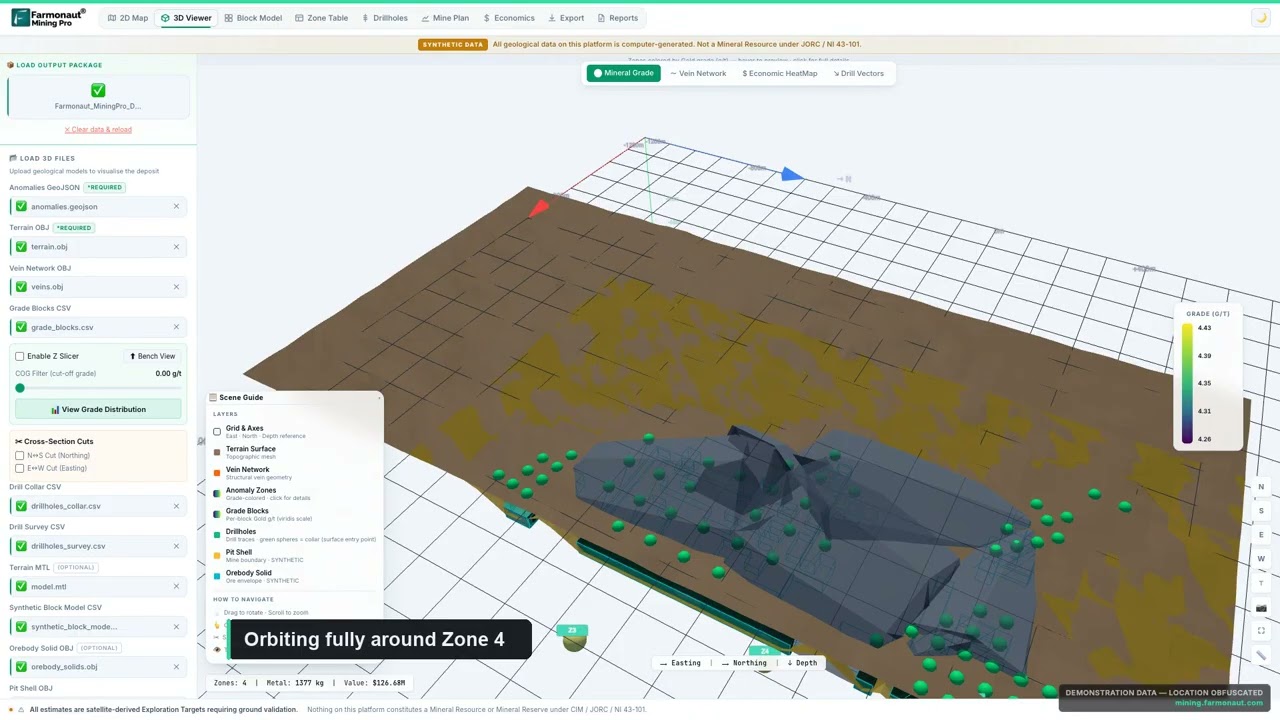
▶ Building a geological 3D scene from terrain, drape and zone depths, on de-identified demo data (16:42) · 16:42
How much terrain error costs in tonnes
A height error across a large footprint quickly becomes a large volume. One metre over 50 hectares is 500,000 cubic metres. The calculator below turns that into tonnes and cost, so you can decide whether a better survey pays for itself before design work relies on it. It shows the worst case of a uniform offset. Real errors vary from place to place and partly cancel out, so the true effect is usually smaller.
Calculator
How much could a height error add in tonnes and cost?
Enter your area, the survey’s height error and your own rock and cost figures.
- Tonnes at your density: 1,350,000
- Cost at your rate (US$): $4,050,000
Example values only, not benchmarks or forecasts. Assumes a uniform worst-case offset across the whole area. Mining cost is an input: use your own figure in US$.
Ore processing plants 3D visualization
Plants are modelled differently from the ground beneath them. Geology tools handle uncertain natural shapes, while plant design tools handle exact objects such as pipes, tanks, steelwork and equipment. Products such as Bentley OpenPlant Modeler and AVEVA E3D Design belong to this group. The plant model is then placed into the site scene as a simplified version, because full detail makes the file heavy and adds little at site scale.
The useful questions for a processing plant are physical ones. Does ore flow by gravity where the design assumes it does? Can a crane reach the mill? Is there space for a future expansion? Where do spills drain? A leach operation adds its own needs, including pad lifts and solution ponds, as our heap leaching techniques guide shows. Tailings belong in the same scene, since their footprint grows through mine life. The Global Industry Standard on Tailings Management shows how much attention these facilities now receive: ICMM reported that 67% of its members’ 836 facilities were in full conformance in August 2025 disclosures.
Underground development and ventilation in 3D
Underground workings are hard to understand on flat plans because levels stack on top of one another. A 3D scene shows how a decline, levels, raises and stopes connect. It also makes it easier to check distances to faults, to old workings and to water.
Ventilation is a good example of a model that does real work. Ventsim DESIGN, from Howden, models airflow through a 3D network of drives and fans. In the US, metal and nonmetal underground mines must keep escape and evacuation plans that include mine maps or diagrams showing principal airflow, escape routes, fans and refuge chambers. A 3D model can help prepare and explain those maps, but it does not replace the required plan or local rules elsewhere. Hand-dug tunnels of the kind described in our guide to tanzanite mining in Tanzania show why a clear picture of the access and escape routes matters at small mines too.
3D visualization software for mining compared
The table lists established tools by the job they do. It is a selection, not a ranking. We chose products with a public page describing that job, and most projects use more than one. Pricing is usually by quote, so ask each vendor about licence type, training and data import before you compare.
| Tool | Best for | Watch for |
|---|---|---|
| Leapfrog Geo (Seequent, part of Bentley) | Fast implicit geological modelling | Mine design and scheduling need other tools |
| Leapfrog Edge (Seequent) | Grade estimation and block models tied to the geology | Estimates still need a competent person to review them |
| Maptek Vulcan | 3D geological modelling, mine design and plans | Broad package, so allow for training time |
| GEOVIA Surpac (Dassault Systèmes) | Drillhole data, geostatistics and mine planning | Sold through a sales contact, with no listed price |
| Deswik | Linking mine designs to schedules | Check how it takes in your geology and block model |
| Micromine Origin | Geological modelling with cloud sharing through Nexus | Check compatibility with your current formats |
| Rocscience Slide3 | 3D limit equilibrium slope stability | An analysis tool, not a site viewer |
| Global Mapper | Terrain, lidar and imagery work on a smaller budget | A GIS tool with no block modelling or mine scheduling |
For blast and drill work once a project is operating, see our comparison of drill and blast monitoring software. For how machinery fits in a site model, see 3D visualization of mining machinery.
What 3D mine visualization costs
There is no standard price, because the cost depends on the data you already hold and the accuracy you need. Budget for four separate items:
Chart
One published software price: Global Mapper annual tiers
US$ per year, starting prices listed October 2026; an example only, not a market average
- Data capture: open satellite elevation and imagery carry no data fee, but survey-grade drone or lidar capture is contracted by area and site access.
- Software: one published example is Global Mapper, listed in October 2026 at starting prices of US$599, US$1,199 and US$2,199 a year by tier, with lidar processing in the top tier shown in the chart. Specialist mining suites are generally quoted individually.
- People: a geologist, an engineer and a surveyor or GIS specialist. This is often the largest cost, and it continues as the model is updated.
- Presentation: animation and virtual reality are separate from engineering work, so ask for them as a separate line in any quote.
When hiring out the work, ask for the native model files, a data list with dates and coordinate details, and the right to reuse the files. A polished video with no underlying data can’t be updated when the design changes.
Mine site development 3D animations and videos
Animations are a communication tool built on the engineering model. Searches for 3D mining visualization videos usually come from people who want a site to appear in sequence: the ground today, then stage one, the advancing development, full production and finally closure. Good animations share a few habits:
- They use real surveyed terrain and the current design, not a generic stand-in.
- They show a date or project year on screen, so a viewer knows which stage they are looking at.
- They label illustrative parts, such as trucks, clouds or vegetation regrowth.
- They show the closure landform, not only the operating mine.
- Vertical scale is true, or the exaggeration is stated, since stretched heights make slopes look steeper than they are.
Be careful with public or investor material. An animation can imply that a design is final, permitted or financed. State the project stage plainly. The videos on this page show working 3D scenes rather than promotional flythroughs, using de-identified demo data.
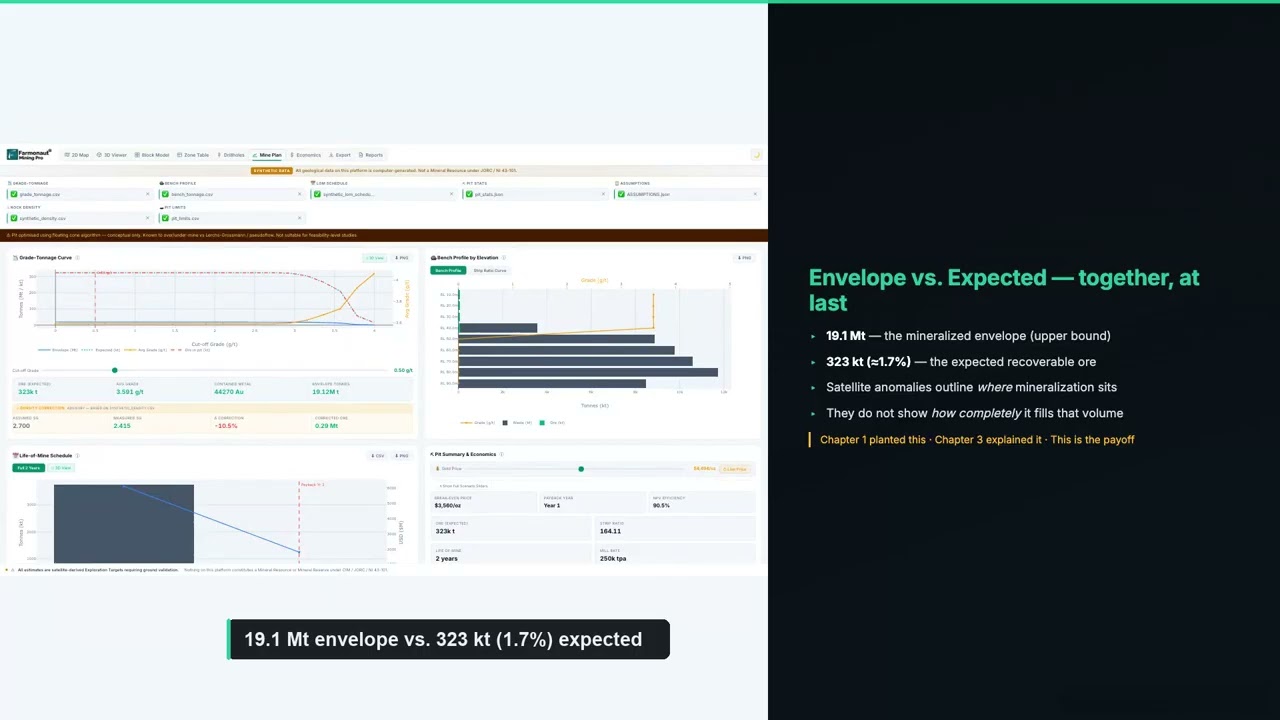
▶ Pit shells and grade-tonnage curves in a conceptual mine plan (18:56) · 18:56
Using 3D models for permits, closure and stakeholders
Regulators still decide on the required documents, not the model. On US federal land, for example, a BLM plan of operations calls for maps of the project area showing activities, processing facilities, waste rock and tailings, along with a reclamation plan. A 3D model can produce those maps and help explain them. Whether a regulator accepts a model as part of a filing is its own decision, so ask early.
Closure is where a model often gets too little attention. Drawing the final landform at the start shows how much material must be kept for backfill and regrading, where water will flow and what a community will see afterwards. Satellite imagery helps at the first stage by showing existing disturbance, roads and drainage before anyone reaches site. Farmonaut’s satellite screening can add early exploration targets and 3D subsurface views at this stage. These are targets ahead of a resource estimate, not a replacement for drilling or a technical report.
What to check before you trust a 3D mine model
Use this list when reviewing a model from a vendor, a seller or a project partner:
- What is the date of each layer, and which is the oldest?
- What is the coordinate system and height datum, and do drill collars sit on the terrain?
- How many holes support each mineralized shape, and how far does the shape extend beyond them?
- Which parts are measured, which are interpreted and which are artist’s impression?
- Has a qualified person reviewed the resource figures, and in what report?
- Do the pit, dumps, plant and tailings fit on the terrain without clashes?
- Have stability and water been analysed, or only drawn?
- Can you get the native files, or only a video?
Honest gaps are normal at an early stage. A model that marks its uncertain parts is more useful than one that presents everything with the same confidence.
Frequently asked questions
What is mine development projects 3D visualization?
It is the practice of placing terrain, drill data, geology, block models, engineering designs and plant in one 3D scene. Teams use it to plan, check for clashes, measure volumes and explain a project.
What is the difference between a 3D visualization and a block model?
A block model is data: a 3D grid of cells holding estimated grade, density and rock type. A visualization is how that data, and others, are displayed. A good-looking view can sit on top of a weak estimate.
Which software is used for 3D mining models?
Common choices include Leapfrog Geo for geology, Maptek Vulcan and GEOVIA Surpac for modelling and planning, Deswik for design and scheduling, and Slide3 or Ventsim for slope and ventilation analysis. Many projects use several.
Is drone photogrammetry or lidar better for a mine site?
Photogrammetry works well on bare, open ground with good ground control. Lidar is the stronger choice under vegetation because pulses can reach the ground. Compare results against independent checkpoints either way.
Can satellite data build a 3D model of a mine site?
It can build a useful early terrain model. Copernicus GLO-30 has about 30 m spacing and a vertical specification under 4 m at 90% confidence. That suits desk studies and regional planning, but not final engineering volumes.
How is an ore processing plant shown in 3D?
It is designed in plant engineering software, such as OpenPlant or E3D, then placed on the site terrain as a simplified model. This keeps the file manageable while still showing layout, access and drainage.
Does a 3D model replace a technical report?
No. A model can support a report, but public resource and reserve disclosures need the work and sign-off of a qualified or competent person under the rules that apply to the company.
How often should a mining model be updated?
Tie updates to events such as new drilling, a new survey or a design change, not only to the calendar. Keep each older version and record what changed.
What is the best format to share a 3D mine model?
Share the native files where both sides use the same software. Otherwise, agree on a common exchange format and test it first. The Open Mining Format was created for this purpose, and common alternatives include DXF for surfaces and CSV for drill data.
More from Farmonaut: agro admin app, carbon footprinting, crop loan and insurance, farmonaut satellite weather api developer docs, fleet management, product traceability, 3d mine mapping transforming mining operations in 2025.
This page is for information only. It is not legal, engineering or investment advice. Confirm the rules with the regulator.
Farmonaut mining
Start your project model with a satellite view
Map a licence area from space, so your team has terrain context and early exploration targets to review before field work.
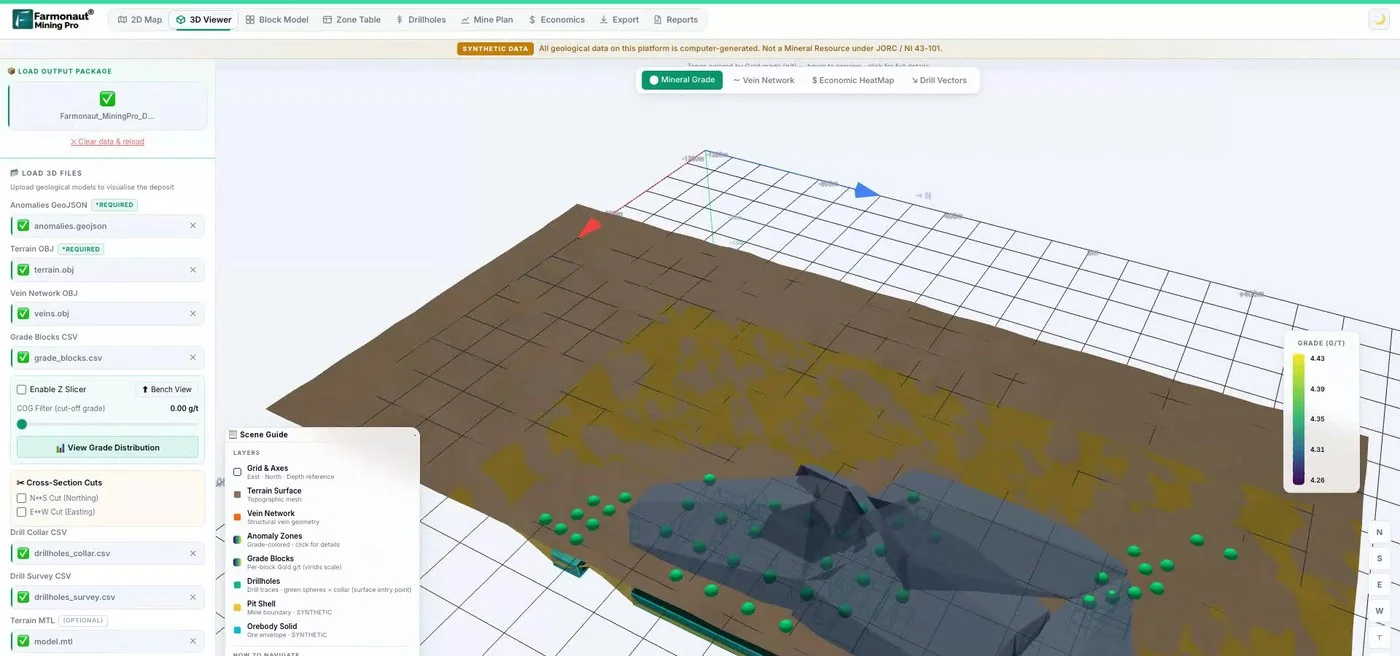
Mining Pro sample view, synthetic data
Keep reading
Sources
- IEA, The Role of Critical Minerals in Clean Energy Transitions: executive summary (2021): iea.org
- IEA, Reliable supply of minerals (2021): iea.org
- Copernicus Data Space, Copernicus DEM specifications: dataspace.copernicus.eu
- NASA/USGS LP DAAC, ASTER Global DEM v3: lpdaac.usgs.gov
- Copernicus SentiWiki, Sentinel-2 mission: sentiwiki.copernicus.eu
- USGS, Topographic data quality levels: usgs.gov
- USGS, 3D Elevation Program: usgs.gov
- Wingtra, Drone surveying accuracy guide (updated July 2026): wingtra.com
- Pankow et al., Massive landslide at Utah copper mine, GSA Today (2014): geosociety.org
- eCFR, 17 CFR 229.1302, qualified person and technical studies: ecfr.gov
- eCFR, 30 CFR 57.11053, escape and evacuation plans: ecfr.gov
- eCFR, 43 CFR 3809.401, plan of operations: ecfr.gov
- ICMM, Tailings Progress Report (November 2025): icmm.com
- Open Mining Format documentation: omf.readthedocs.io
- Seequent, Leapfrog Geo: seequent.com
- Seequent, Leapfrog Edge: seequent.com
- Maptek, Vulcan: maptek.com
- Dassault Systèmes, GEOVIA Surpac: 3ds.com
- Deswik, mining software: deswik.com
- Micromine, mining software: micromine.com
- Rocscience, Slide3: rocscience.com
- Howden, Ventsim: ventsim.com
- Bentley, OpenPlant Modeler: bentley.com
- AVEVA, E3D Design: aveva.com
- Blue Marble Geographics, Global Mapper pricing (October 2026): bluemarblegeo.com
Discussion
Questions, corrections or field experience? Share them below. First-time comments are reviewed before they appear, and your email is never published.
No comments yet. Be the first to add a question or your experience.

 Berks Gold Limited
 Mwerezi Minerals Company Limited
 Congo Mining Solutions
 Mining SARL
 SenGold Invest SAS
 Sania Corporation
 Sean Mining Limited
 NTS Group (Pty) Ltd
 Mine4Africa
 Lithspo Minerals Limited
 Tintina Mining Group
 Dalgety Minerals Pty Ltd
 Vortex Minerals Pty Ltd
 Faith At Work (Pty) Ltd
 Geotech Mining Solutions plc
 Vulcan International Limited
 Kidepo Associates
 Licence holder · Nigeria · Gold + lithium
 Client · Somalia · Gold